
Free Weekly Meal Planning Template (Printable PDF, 2026)
Updated 6 November 2026
A meal planning template is a one-page grid where you write down what you will eat each day of the week, with space for the grocery list that goes with it. Ours is free, prints on one sheet, and has a row for breakfast, lunch, dinner and snacks, a grocery list split by aisle, a "use up first" box for food that needs eating, and a "prep ahead" box for anything you can cook in advance.
Download the free template:
No email or sign-up needed. Print it, stick it on the fridge, and fill it in once a week.
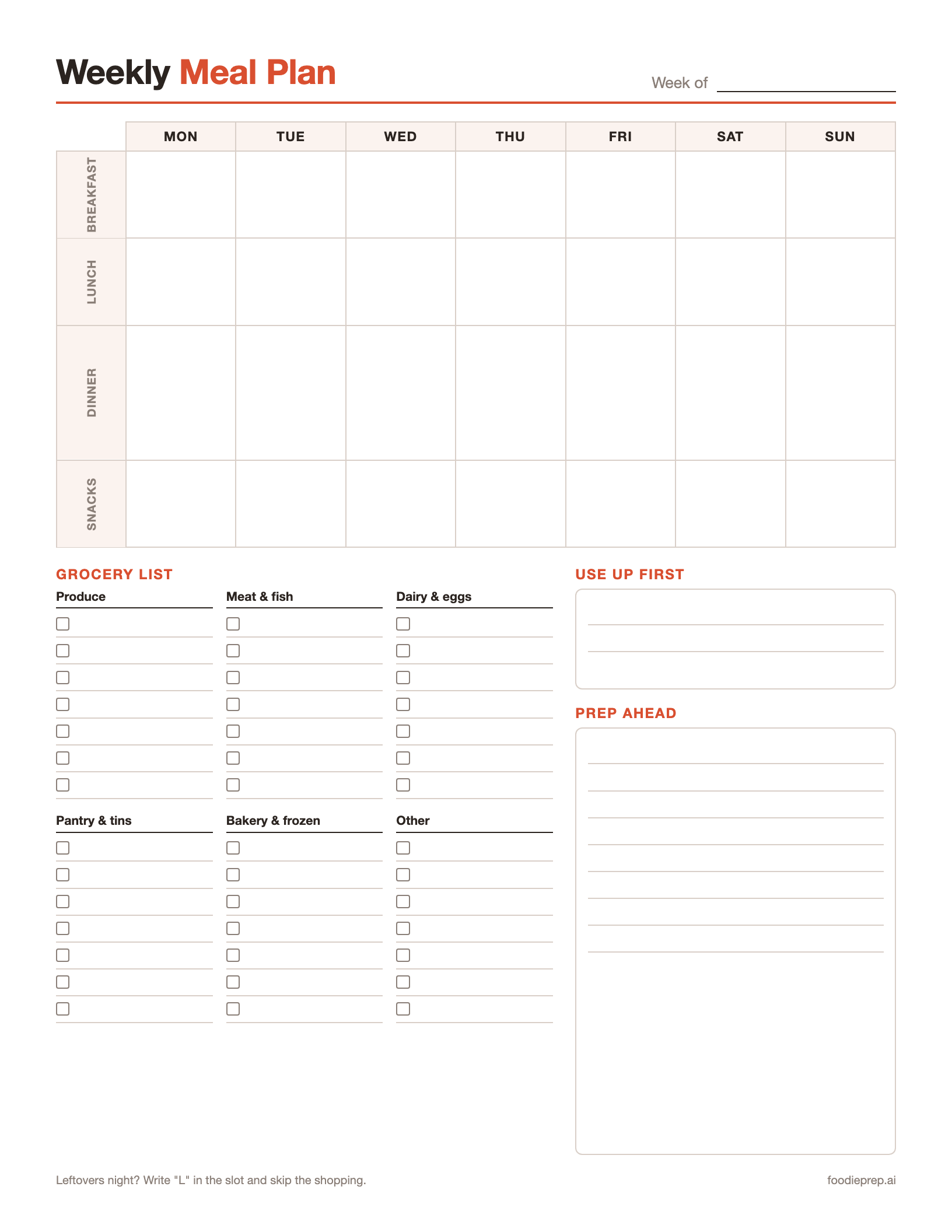
What's on the template
Each section exists for a reason. Most weekly plans fall apart for one of four reasons: no plan for lunches, a shopping list written from memory, food left to go off in the fridge, or no time to cook on a busy night. The template has a section for each.
| Section | What to write in it | Why it helps |
|---|---|---|
| Weekly grid (Mon–Sun × breakfast, lunch, dinner, snacks) | One meal per box. Use "L" for a leftovers night and "Out" for nights you won't cook. | You decide once, on one day, instead of every evening at 6 pm. |
| Grocery list (produce, meat and fish, dairy and eggs, pantry and tins, bakery and frozen, other) | Every ingredient you don't already have, sorted by where it sits in the shop. | You shop once and walk the aisles in order. |
| Use up first | Food already in your fridge that needs eating this week. | Meals get planned around it before it goes off. |
| Prep ahead | Jobs you can do in advance: cook a grain, chop onions, marinate chicken. | Your busiest night gets the meal that is half made. |
Dinner gets the tallest row because it is the meal most people plan. Breakfast and lunch are often the same few options all week; write "oats or eggs" across the row if that's how your week works.
How to fill in a meal planning template in 20 minutes
You don't need a perfect week. You need a written one. Here's the order that works:
- Check what you already have. Open the fridge, freezer and cupboards, and write anything that needs using in Use up first. A pantry staples list helps you see what you're running low on.
- Look at your calendar. Mark late nights, evenings out and nights someone else is cooking. Write "Out" in those boxes now so you don't buy food for them.
- Fill in dinners first. Start with meals that use your "use up first" items. Then add one or two easy favourites and, if you like, one new recipe. Leave one night as leftovers ("L").
- Add lunches and breakfasts. Plan lunches as leftovers from the night before where you can: cook a double batch on Sunday and Monday's lunch is done.
- Write the grocery list. Go meal by meal and add each missing ingredient under its aisle heading. Check the list against what you already have before you shop.
- Fill in prep ahead. Pick one or two jobs for the weekend (a batch of rice, chopped veg, a sauce) that make the hardest weeknight easier. Our guide to meal prepping for the week in under 2 hours has a full prep order.
- Put it where you'll see it. On the fridge, or take a photo on your phone so the grocery list comes shopping with you.
Example: a filled-in week
Here's how a family of four might fill in the dinner row. It uses two cook-once, eat-twice nights, so it needs five cooking nights, not seven.
| Day | Dinner | Notes |
|---|---|---|
| Monday | Chicken and vegetable stir-fry with rice | Cook double rice for Tuesday |
| Tuesday | Egg fried rice with peas | Uses Monday's rice |
| Wednesday | Spaghetti bolognese | Make a double batch of sauce |
| Thursday | Leftover bolognese baked potatoes ("L") | No cooking: reheat Wednesday's sauce |
| Friday | Homemade pizza night | Shop-bought bases, toppings from "use up first" |
| Saturday | Out | Nothing to buy |
| Sunday | Roast chicken, potatoes and greens | Leftover chicken goes into Monday's lunch wraps |
Two things make this plan work. Every leftover is eaten within a day or two, and the USDA says cooked leftovers keep in the fridge for 3 to 4 days or in the freezer for 3 to 4 months. And nothing on the grocery list is bought for a night nobody is home.
Want the full week, with recipes and a grocery list for four? See our weekly family meal plan.
Why a weekly template saves money
Wasted food is the cost most people don't see. According to the USDA, "each year, the average American family of four loses $1,500 to uneaten food". A written plan cuts that in three ways: you buy for meals you will actually cook, the "use up first" box gets what's already in the fridge eaten, and leftovers are planned in rather than forgotten.
For more ways to cut the bill, see cheap meal prep and smart ways to save on groceries.
Tips that make a meal plan template stick
- Plan on the same day every week. Sunday morning or the evening before your shop works for most people. Twenty minutes is enough once you've done it twice.
- Keep a "greatest hits" list. Write down ten dinners your household always eats. On a week with no ideas, plan from that list.
- Theme the nights if deciding is the hard part. Taco Tuesday, pasta Wednesday, fish Friday. Themes narrow the choice without fixing the recipe.
- Plan leftovers on purpose. A planned "L" night is the cheapest and fastest meal of the week.
- Don't plan seven new recipes. One new dish a week is plenty; the rest should be meals you can cook without reading the method.
- Keep old templates. After a month you have four ready-made weeks to reuse.
Make it in Google Sheets, Excel or Canva instead
Prefer to type? You can rebuild the grid in a spreadsheet in a few minutes:
- In Google Sheets or Excel, put the days of the week across row 1 (columns B to H).
- Put Breakfast, Lunch, Dinner and Snacks down column A.
- Below the grid, add a column for each grocery aisle (produce, meat and fish, dairy and eggs, pantry, bakery and frozen, other).
- Add a tick-box column next to the grocery list (in Google Sheets: Insert → Checkbox).
- Duplicate the sheet each week (right-click the tab → Duplicate) so you keep last week's plan to reuse.
Canva also has free meal planner designs you can edit if you want something more decorative. A spreadsheet has one advantage over paper: you can copy last week's plan and change two meals instead of starting from blank.
Paper template vs a meal planning app
Disclosure: FoodiePrep (foodieprep.ai) is our app. The comparison below is about the method, paper versus app, and FoodiePrep's limits are listed alongside its strengths.
A paper template is free, quick and works for anyone. Where it gets slow is the grocery list: copying every ingredient from every recipe by hand is the part most people skip, and it's why plans fall apart midweek.
| Paper or spreadsheet template | Meal planning app (e.g. FoodiePrep) | |
|---|---|---|
| Cost | Free | FoodiePrep has a free Taster plan; Nutrition Pro is paid |
| Filling in the week | You choose every meal | Ask Chef Foodie, FoodiePrep's AI assistant, to fill the week ("5 dinners, vegetarian, from Monday"), then swap any meal |
| Grocery list | Written by hand | Built from the recipes in the plan |
| Using what you have | "Use up first" box | Plan "from my pantry"; shopping-list items you already have in your pantry are flagged for you to check |
| Leftovers and batch cooking | Write "L" | Ask for one meal's leftovers in a later slot, or "Batch cook" a meal across later days |
| Reusing a good week | Keep the sheet | Plans made with Chef Foodie are saved as reusable templates in the Templates tab |
| Nutrition | Not tracked | Per-recipe nutrition; you can ask for daily calorie or protein targets when planning |
| Shopping | Take the list to the shop | Guided Shopping walks you through adding each item to a supported supermarket's online cart (e.g. Walmart, Kroger, Tesco, Sainsbury's) |
FoodiePrep's limits are worth knowing. There is no button to turn a week you've already planned in the Calendar into a template; templates come from a Chef Foodie plan or are built in the Templates tab. Accounts aren't shared between family members; a household shares one login. And the pantry isn't tracked automatically: you add items yourself (or scan a photo), and nothing is deducted when you cook.
If you like the paper template's structure, the app follows the same idea: a week grid, a grocery list and a pantry check. You can import the recipes you already cook from any website or social video, so your "greatest hits" list comes with you. Our comparison of meal planning apps with built-in grocery lists covers the other options.
Frequently Asked Questions
Is this meal planning template really free?
Yes, the template is free to download, print and reuse, with no email or sign-up. There's a US Letter PDF and an A4 PDF on this page. Print as many copies as you like.
What should a weekly meal plan include?
A weekly meal plan should include every meal you'll eat at home for seven days, plus the grocery list for those meals. The most useful extras are a note of food you need to use up, the nights you won't cook, and any prep you can do ahead. The template has a space for each.
How do I make my own meal planning template?
Draw a grid with the seven days across the top and your meals (breakfast, lunch, dinner, snacks) down the side, then add a grocery list underneath. In Google Sheets or Excel that's a 5 × 8 grid plus a checklist column. The steps are in the Google Sheets section above.
How do I use a meal planning template for meal prep?
Fill in the week first, then write the jobs you can do in advance in the "prep ahead" box: cooking grains, chopping vegetables, making sauces or cooking a protein in bulk. Do those on one day, usually Sunday, and the weeknight meals take minutes. See our meal prep for beginners guide for a step-by-step plan.
How long does it take to fill in a meal plan template?
About 20 minutes once you've done it a couple of times. The first week takes longer because you're building your list of go-to meals. After that, most weeks are a mix of favourites and one new recipe.
How long do leftovers last for a leftovers night?
The USDA says leftovers can be kept in the refrigerator for 3 to 4 days or frozen for 3 to 4 months. Plan leftover nights within that window, and freeze anything you won't eat in time.
Can I plan meals around what I already have?
Yes. Write what needs eating in the "use up first" box before you plan anything else, then build dinners around it. Our guide to planning meals around what you already have goes through it in detail.
Is a printable template or a meal planning app better?
A printable template is better if you want something free and simple; an app is better if writing the grocery list is what stops you planning. Many people start on paper and move to an app once they know which meals they cook every week. Apps like FoodiePrep build the grocery list from the plan for you.
Start this week
Download the free weekly meal planning template (PDF) (A4 version), fill in five dinners and one leftovers night, and write the grocery list before you shop. If you'd rather not write the list by hand, try FoodiePrep free: Chef Foodie fills the week, the grocery list builds itself, and a plan you like becomes a template to reuse. It's on iPhone, Android and the web.
Related reading
The 7 Best Pantry Meal Planning Apps in 2026 (Ranked & Compared)
We compared the 7 best pantry meal planning apps of 2026 — apps that plan your week around what you already own, flag duplicates before you buy them, and cut food waste.
Automating Meal Planning and Grocery Budgeting with AI: A Practical, Money‑Smart Approach
Learn how AI can automate meal planning and grocery budgeting, helping you save time, reduce food waste, and keep weekly grocery spending predictable.
The 8 Best Meal Planning Apps With Grocery Lists (2026 Comparison)
A 2026 side-by-side comparison of the 8 best meal planning apps with built-in grocery lists — covering auto-updating shopping lists, pantry awareness, shared family access, and nutrition data.